Automated Market Intelligence: Flaschenpost Data Pipeline
01 Challenge
In the highly competitive e-grocery market, daily competitor price information decides your own margin – tracking it by hand across thousands of products is not feasible.
02 Approach
Reverse engineering Flaschenpost’s internal endpoints, fetching the JSON data per category in parallel, loading it into a normalized SQLite schema and analyzing it with SQL in a Flask dashboard.
03 Result
An automated pipeline covering 5,000+ products that surfaces price trends, top offers and inventory gaps (out-of-stock) early.
In highly competitive e-commerce markets like e-grocery, daily competitor price information is critical for your own margins. This project automates data collection for over 5,000 products to detect price trends and inventory gaps early.
- Products
- 5,000+
- collected automatically
- Data source
- JSON
- internal API instead of HTML parsing
- Data model
- 3NF
- relational schema in SQLite
- Top discount
- 76.5 %
- highest value in the dashboard snapshot
- 01Network analysisIdentify the JSON endpoint per categoryFirefox DevTools
- 02ExtractionFetch categories in parallel and store as JSONThreadPool
- 03Data modelStore master and article data normalizedSQLite
- 04Product imagesDownload images from the DB in parallelRequests
- 05DashboardFree-form SQL queries with image previewFlask
1. Data Strategy: API Instead of HTML
Instead of parsing HTML, I analyzed the internal interfaces of the Flaschenpost app. This allows structured access to master data – without the server load of a classical crawler.
Classical HTML crawler
- Fragile parsing – breaks with every layout change
- Loads full pages including markup
- High server load from many page requests
Internal JSON API
- Structured data straight from the source
- One request per category
- Low load, fast and robust
Monitored categories include obst-gemuese, kuehlregal/frisch-fertig and kuehlregal/fleisch-fisch-veggie.
2. Network Analysis with Firefox
Using the Firefox network analysis tool, I examined the format in which the website loads its data. The key was the URL https://www.flaschenpost.de/data/[CATEGORY]/23, which returns a JSON list of all products in a category.
3. Relational Data Model & SQL Analysis
For long-term price analysis, the JSON data is transferred into a relational schema (3rd normal form):
- product – static master data (name, brand, description)
- articles – pricing factors (package price, price per liter, availability)
- allergenes / details – normalized detail tables
This enables analyses that go beyond Excel evaluations – for example, finding price outliers within a brand:
-- Example analysis: average price per brand with deviation
SELECT
    p.brandName,
    COUNT(a.id) as article_count,
    ROUND(AVG(a.price), 2) as average_price,
    MAX(a.price) as max_price
FROM product p
JOIN articles a ON p.id = a.productId
GROUP BY p.brandName
HAVING COUNT(a.id) > 5
ORDER BY average_price DESC;
Schema implementation (excerpt):
c.execute("""
    CREATE TABLE IF NOT EXISTS product (
        id INTEGER PRIMARY KEY,
        alcoholInfo TEXT,
        alphabeticSort INTEGER,
        backgroundColor TEXT,
        brandId INTEGER,
        brandName TEXT,
        brandWebShopUrl TEXT,
        categoryId INTEGER,
        colorProfileId INTEGER,
        descriptionText TEXT,
        ghsInfo TEXT,
        ...
    )
""")
conn.commit()
4. Data Extraction
BeautifulSoup first helped to locate the relevant category URLs in the website’s DOM. The actual extraction is handled by scrape_data(value): the function builds the endpoint URL from the category, loads the JSON and saves it into a timestamped folder (slashes in the category name become dashes).
Using ThreadPoolExecutor from concurrent.futures, all categories in the value_list are fetched in parallel – which shortens the overall runtime.
timestamp = int(time.time())
folder_path = f"data/{timestamp}"
os.makedirs(folder_path, exist_ok=True)

def scrape_data(value):
    url = f"https://www.flaschenpost.de/data/{value}/23"
    response = requests.get(url)
    data = response.json()
    value = value.replace("/", "-")
    file_path = os.path.join(folder_path, f"{value}.json")
    with open(file_path, "w", encoding="utf-8") as file:
        json.dump(data, file, indent=4)

with concurrent.futures.ThreadPoolExecutor() as executor:
    executor.map(scrape_data, value_list)
5. Downloading Product Images
For a visual representation in the dashboard, the product images linked in the database are downloaded – also in parallel, and only if the image does not exist locally yet:
import requests
import json
import time
import os
import concurrent.futures
import sqlite3
from datetime import datetime

conn = sqlite3.connect('main.db')
c = conn.cursor()
c.execute("SELECT id, image, imageArticleId FROM product;")
rows = c.fetchall()
conn.close()

# create folder if not exists images
if not os.path.exists('images'):
    os.makedirs('images')

# download images from database concurrently
def download_image(row):
    url = row[1]
    imageArticleId = row[2]
    # check if image already exists
    if os.path.exists(f'images/{imageArticleId}.png'):
        print(f'Image {imageArticleId} already exists')
        return
    else:
        r = requests.get(url)
        with open(f'images/{imageArticleId}.png', 'wb') as f:
            f.write(r.content)
        print(f'Image {imageArticleId} downloaded')
        return

# download images concurrently
with concurrent.futures.ThreadPoolExecutor() as executor:
    executor.map(download_image, rows)

print('All images downloaded')
6. Dashboard with Flask
A lean Flask app provides a route (/) for GET and POST requests: users enter an SQL query and the results appear on the same page, including product images.
The core query calculates the discount per article and filters available products tagged “Tagesangebot” or “TOP-ANGEBOT” – sorted by discount in descending order:
SELECT DISTINCT p.name,
                a.imageArticleId,
                a.id,
                a.product_id,
                a.price,
                a.crossedPrice,
                ROUND(((a.price - a.offerPrice) / a.price) * 100, 2) AS discountPercentage,
                a.offerPrice,
                a.pricePerUnit,
                a.offerPricePerUnit
FROM articles a
JOIN product p ON a.product_id = p.id
WHERE a.onTopOfferText IN ("Tagesangebot", "TOP-ANGEBOT")
AND a.isAvailable = 1
ORDER BY discountPercentage DESC
from flask import Flask, render_template, request
import sqlite3
app = Flask(__name__, static_folder="images")
DATABASE = 'main.db'
def query_database(query):
conn = sqlite3.connect(DATABASE)
cursor = conn.cursor()
cursor.execute(query)
data = cursor.fetchall()
conn.close()
return data, [description[0] for description in cursor.description]
@app.route('/', methods=['GET', 'POST'])
def index():
headers = []
rows = []
if request.method == 'POST':
user_query = request.form['query']
results, headers = query_database(user_query)
rows = results
return render_template('index.html', headers=headers, rows=rows)
if __name__ == '__main__':
app.run(debug=True)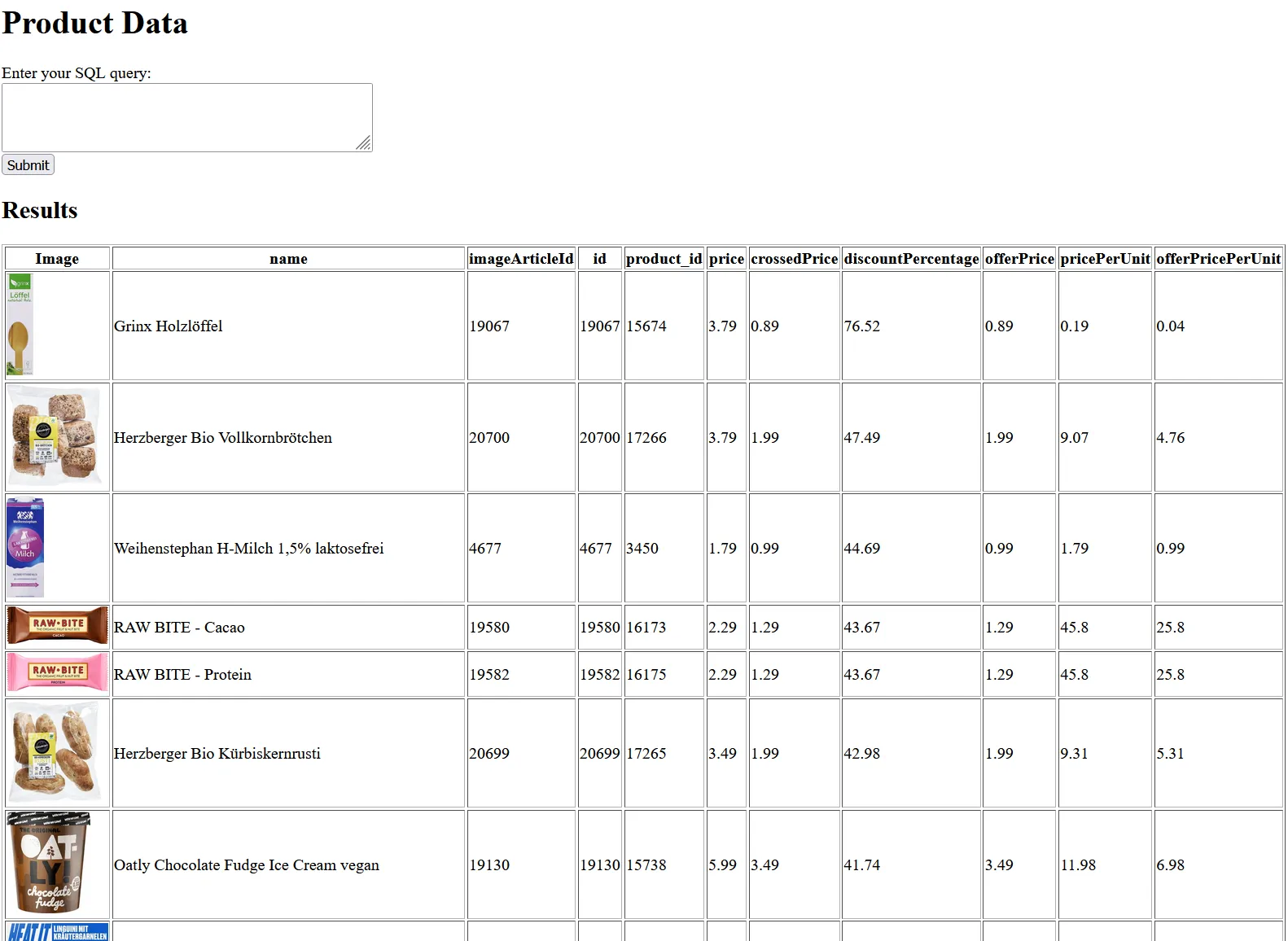
Values from Fig. 2 (discountPercentage), snapshot
Bonus Feature: Adding Items to the Cart
Items can also be added programmatically via the web shop’s cart API. A JSON object defines article ID, origin and quantity; a POST to https://www.flaschenpost.de/webshop-cart-api/api/v1/addCartPositions (with the required cookies and headers) returns the updated cart including items and total price.
json_data = {
    'positions': [
        {
            'articleId': row[2],
            'articleOrigin': 1,
            'quantity': 1,
        },
    ],
    'cartVersion': 40,
}

response = requests.post(
    'https://www.flaschenpost.de/webshop-cart-api/api/v1/addCartPositions',
    cookies=cookies,
    headers=headers,
    json=json_data,
)
Possible Extensions
- Price tracking & alerts: Regular collection reveals trends and price fluctuations and enables alerts on price changes.
- Inventory tracking: Notifications when a product is back in stock or running low.
- Personalized recommendations: Product suggestions based on previous purchases.
- Subscription shopping: The shop has no feature to repeat a purchase – the cart API makes it possible to automate this.
- LLM recipe suggestions: An LLM assembles a dish from the products in the database, e.g. “Create a cart with a healthy and affordable lunch.”