AI Productivity Suite: Desktop Workflow Automation
01 Challenge
In day-to-day operations (support, content), context switching costs time: copy text, open ChatGPT, paste, wait, copy back – and sensitive data ends up in the cloud.
02 Approach
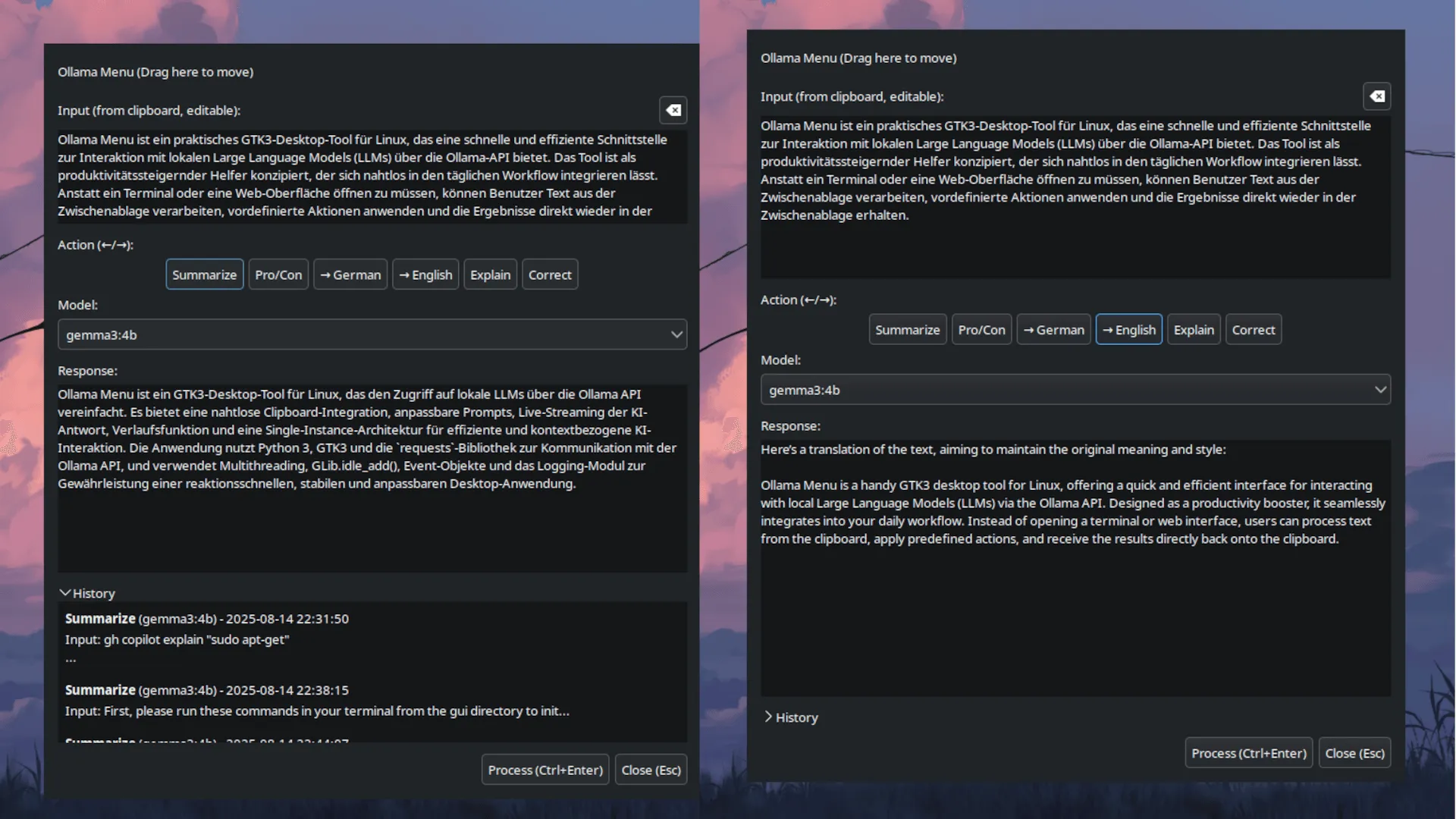
A native GTK3 tool launches with the clipboard content, offers predefined actions and streams the response of a local Ollama model in real time.
03 Result
AI functions at a keystroke, right inside the desktop workflow – no copy-paste detours, and no company data leaving the laptop.
In the day-to-day operations of an e-commerce manager (e.g. customer support, content creation), a lot of time is lost through context switching: you copy text, open ChatGPT, paste it, wait, copy it back.
Ollama Menu is a “productivity suite” that integrates AI functions directly into the desktop workflow. It eliminates the “copy-paste madness” and gives employees access to company-owned AI models with a single keystroke.
- Default actions
- 6
- Summarize · Pro/Con · Translate · Explain · Correct
- History entries
- 100
- Input, output, model, action
- Inference
- local
- any Ollama model selectable
- Instance
- 1
- Single instance via PID file
Business Value: Efficiency Gains
Before: copy-paste workflow
- Copy text
- Open ChatGPT in the browser
- Paste, type a prompt, wait
- Copy the answer back
- Data leaves the company
With Ollama Menu
- Tool launches with the clipboard
- Pick an action with the arrow keys
- Ctrl+Enter – the answer streams live
- Use the result right away
- Local model, data stays on the laptop
- Support acceleration: An agent marks a customer email and selects “Draft Reply” – the draft is instantly in the clipboard.
- Content standardization: Writers use predefined prompts (e.g. “SEO optimization for product description”) for consistent results.
- Privacy: Since local models (via Ollama) are used, no sensitive company data ever leaves the employee’s laptop.
Key Features
- Seamless clipboard integration: Launches with the current clipboard content, which can be edited directly.
- Customizable actions: An external
prompts.jsondefines actions with their own system prompts – freely extensible. - Dynamic model selection: Automatically detects all locally available Ollama models and lists them in a dropdown.
- Live streaming: The response appears in real time as it is generated – key for the user experience with longer answers.
- History: Saves the last 100 requests (input, output, model, action) for quick restoring and copying.
- Keyboard control: Arrow keys to choose an action,
Ctrl+Enterto submit,Escto close.
Architecture
The tool is built as a native GTK3 interface to consume minimal resources and run stably in the background.
- 01InputClipboard content, editableClipboard
- 02Action & modelSystem prompt from prompts.json, model from Ollamaprompts.json
- 03Background threadRequest to the Ollama REST API, previous request is cancelledthreading
- 04StreamingUI updates safely on the main threadGLib.idle_add
- 05HistoryResult is saved and can be copiedhistory.json
Technical Highlights and Solutions
Responsive UI through Multithreading
Problem: Requests to the Ollama API can take several seconds. Run on the main thread, they would freeze the entire interface.
Solution: Each request runs in its own background thread (threading.Thread), so the GUI stays responsive at all times. To safely update components like the response text field from the background, GLib.idle_add() is used: all UI updates run on the main thread, preventing race conditions.
Robust Process Management
Problem: A user might accidentally start a new request while an old one is still running.
Solution: Cancellation logic using threading.Event: before a new thread starts, the system checks whether one is already running – if so, it receives a cancel signal. This ensures predictable behavior and prevents overlapping requests. Live streaming also gives immediate feedback.
Clean Architecture and Configuration
Problem: Hardcoded prompts and settings make an application inflexible.
Solution: The application follows the XDG Base Directory standard: configuration (prompts.json) lives in ~/.config, application data (history.json) in ~/.local/share. Code and user data are separated, keeping the tool easy to customize and maintain.
Professional Application Handling
The single-instance lock via a PID file (/tmp/ollama-menu-python.pid) prevents users from accidentally opening multiple windows, which would cause confusion and unnecessary resource consumption.
Structured logging (the logging module) and clean exception handling ensure stability and make debugging easier.